This post contains affiliate links. We may earn a commission when you download a freebie or buy a subscription on Creative Fabrica, at no extra cost to you.
You finally got comfortable enough in Procreate to letter a quote you would actually post. The sketch is clean, the palette is right, the brush feels good under the Pencil. Then you go to set the words, and the font picker hands you the iPad system fonts: Helvetica, a few polite sans serifs, not one of them looking like it was drawn by hand. The lettering was the whole point, and the default shelf is the one thing on the iPad that cannot do it.
The good news: you are not stuck with that shelf. The fix costs nothing, and the install takes about a minute once you know the one file-type trick that trips everyone up. Below are 30 free fonts worth putting on your iPad, sorted by the look you are going for, plus the exact steps to get them into Procreate.
The best free Procreate fonts are real font files (.otf or .ttf) you download and import through the text tool. Google Fonts is the safest free well, since every font there is open-source and cleared for commercial use, so you can letter a quote, a logo, or a product to sell without a licensing headache. Pick by the job, install the few you love, and skip the rest.
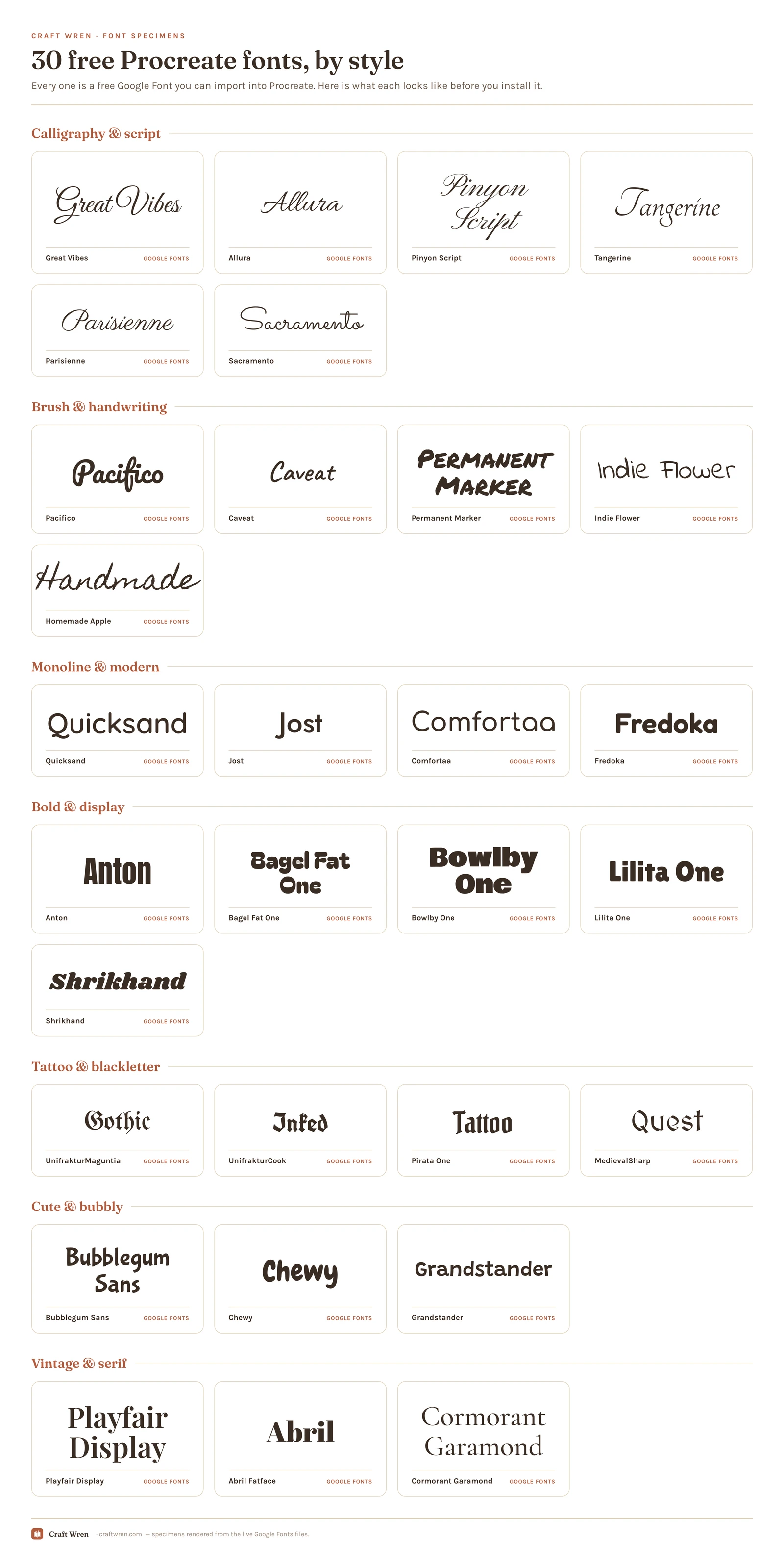
The 30 below are a shelf to shop, not a haul to hoard. They are sorted by look, so when a project needs a wedding script or a gothic tattoo word, you can jump straight to that group and ignore the rest.
Smallest print size is measured from each font file: the letter height at which the thinnest part of the stroke drops to 0.25 mm, which is roughly where home printing starts losing the line. Screens forgive more, vinyl forgives less.
Font
Sub-style
What it gives you
Smallest print size
Anton
Bold
Tall heavy condensed, poster headline
1.5 mm
Fredoka
Monoline
Rounded and gently chunky for headers
1.6 mm
Lilita One
Bold
Fat but tidy, bold without shouting
1.6 mm
Bowlby One
Bold
Chunky rounded display, retro presence
1.6 mm
Chewy
Cute
Soft, fat, bouncy: birthday-banner energy
1.8 mm
Bubblegum Sans
Cute
Rounded and playful, kids-party lettering
1.9 mm
Grandstander
Cute
Rounded wobble, cheerful homemade feel
1.9 mm
Bagel Fat One
Bold
Balloon-fat letters that need to run big
2.1 mm
Quicksand
Monoline
Geometric rounded sans, friendly workhorse
2.1 mm
Shrikhand
Bold
Heavy display, warm vintage character
2.1 mm
Pacifico
Brush
Warm surfy brush, casual friendly
2.3 mm
Jost
Monoline
Crisp Futura-style geometric sans, grown-up
2.3 mm
Permanent Marker
Brush
Fat marker with Sharpie boldness
2.5 mm
Comfortaa
Monoline
Fully rounded balloon-soft, calm modern
2.5 mm
Caveat
Brush
Real-pen handwriting, slanted authentic look
3.3 mm
Indie Flower
Brush
Bubbly rounded, sweet and approachable
3.8 mm
Pirata One
Tattoo
Rougher blackletter gothic, modern readable
4.6 mm
Sacramento
Calligraphy
Clean monoline script, modern signature
5.4 mm
Homemade Apple
Brush
Realistic cursive loop, personal signature
5.5 mm
UnifrakturCook
Tattoo
Bolder blackletter, heavier punch weight
5.5 mm
Parisienne
Calligraphy
Casual bouncy script, friendly cards
8.5 mm
Playfair Display
Vintage
High-contrast elegant serif, editorial look
8.5 mm
Allura
Calligraphy
Softer with graceful swashes, single names
8.5 mm
MedievalSharp
Tattoo
Hand-cut gothic, grungier medieval edge
8.5 mm
Cormorant Garamond
Vintage
Refined thin classic, quiet delicate
10.0 mm
Abril Fatface
Vintage
Thick swooping display serif, dramatic
10.0 mm
UnifrakturMaguntia
Tattoo
Classic blackletter ornate, dense dramatic
10.0 mm
Tangerine
Calligraphy
Thin airy dramatic, flourishes only
11.9 mm
Great Vibes
Calligraphy
Wedding classic with loops, big sizes only
12.0 mm
Pinyon Script
Calligraphy
Old-fashioned copperplate, formal and vintage
14.9 mm
How to add fonts to Procreate
Installing a font takes about a minute, and the steps are the same whether it is one font or twenty. The only real gotcha is the file itself, so start there.
First, get the font onto your iPad. Download it (from Google Fonts, tap the family, then download the family), and make sure the file lands in your Files app or iCloud Drive, because Procreate can only import a font that is already saved on the device. If the download arrives as a .zip, tap it once in Files to unzip it first, then dig out the actual font file inside. Procreate takes .otf, .ttf, and .ttc files, and if a download gives you both an .otf and a .ttf, reach for the .otf version.
Then bring it into Procreate. Open any artwork and:
Tap the Actions menu (the wrench), open the Add tab, and tap Add text.
With the text box active, tap the style button in the top-right corner of the on-screen keyboard to open the style panel.
Tap Import in the top-right of that panel.
Find your font in Files and tap to select it. It installs instantly and shows up in your font list, ready to use.
There is an even faster shortcut for a single font: find the .otf file in Files and just tap it once. In most cases Procreate opens on its own and installs the font with no menu-digging at all. If you ever cannot find a font you swear you installed, it is almost always still zipped, or you tapped the .ttf when an .otf was sitting right next to it.
The 30 free fonts, by style
Now the list itself, grouped by the look. You do not need all 30. Skim to the style you work in, install two or three, and move on.
Calligraphy and script fonts
The biggest category for Procreate lettering, and the one people reach for first: flowing scripts for quotes, wedding work, signatures, and pretty headers.
Great Vibes. The wedding-invitation classic. Elegant, looping, and confident at large sizes, though it gets muddy if you shrink it, so keep it big.
Allura. Softer and lighter than Great Vibes, with long graceful swashes. Beautiful for a single name or the one star word in a quote.
Pinyon Script. Fine, old-fashioned copperplate, the kind that looks like a fountain-pen RSVP. Reach for it when a piece needs to feel formal and a little vintage.
Tangerine. Thin and airy with dramatic capitals. Built for short flourishes and monograms, not a full paragraph.
Parisienne. A casual, slightly bouncy script that feels friendlier than the formal ones. Lovely on cards and everyday quote art.
Sacramento. A clean monoline script, meaning one even stroke weight throughout. This is the modern signature look you have seen on a thousand logos, and it stays readable smaller than the fancy scripts do.
Brush and handwriting fonts
When you want it to look like a human did it by hand: casual quotes, planner pages, sticker text, anything that should feel warm rather than typeset.
Pacifico. A warm, surfy brush script. Rounded and relaxed, it makes anything read casual and friendly in one move.
Caveat. Slanted, real-pen handwriting that genuinely looks handwritten instead of faked. Perfect for annotations and quick casual quotes.
Permanent Marker. Fat marker lettering with full Sharpie energy. Loud, a little messy, and great for a bold single line.
Indie Flower. Bubbly, rounded print handwriting. Sweet and approachable without tipping into childish.
Homemade Apple. A realistic looping cursive that reads like an actual handwritten note. Use it small and personal, like a signature or a margin scribble.
Monoline and modern fonts
Clean and even-weighted, with no fuss. This is the group for minimal logos, modern quote graphics, and tidy planner headers.
Quicksand. A geometric rounded sans with even strokes. The friendly-minimal workhorse that goes with almost anything.
Jost. A crisp, Futura-style geometric sans, a touch more fashion-magazine than Quicksand. Clean and grown-up.
Comfortaa. Fully rounded and balloon-soft. It reads calm and modern, and it is a favorite for spa-and-wellness type looks.
Fredoka. Rounded and gently chunky. The cheerful pick when a header needs a little more weight and warmth.
Bold and display fonts
Built to be big. These are too much personality for body text and exactly right for the one loud word at the top of a poster.
Anton. Tall, heavy, and condensed. Set one word of it big across the top and you have an instant poster headline.
Bagel Fat One. Extremely fat and rounded, basically a balloon of a font. The pick for a word you want read from across the room.
Bowlby One. Chunky rounded display with real presence and a slight retro lean. Loud but not silly.
Lilita One. Fat but tidy, a little more buttoned-up than Bagel Fat One. The bold pick when you still want it to look composed.
Shrikhand. A heavy display face with a warm, vintage-poster flavor. Lots of character without trying too hard.
Tattoo and blackletter fonts
The gothic, Old English, band-poster end of the shelf. Heavy, ornate, and the most-searched single style for Procreate tattoo work.
UnifrakturMaguntia. Classic ornate blackletter, the textbook Old English tattoo look. Dense and dramatic, best in short words.
UnifrakturCook. A bolder, blacker cut of the same idea. Heavier strokes give a tattoo word more punch and weight.
Pirata One. A single-weight blackletter that is a little rougher and more modern, and noticeably easier to read than full Old English.
MedievalSharp. A rougher, hand-cut gothic with less formality. Good when you want a grungier medieval edge rather than a polished one.
Cute and bubbly fonts
The sweet, rounded, just-for-fun corner. Reach here for kids’ designs, party invites, and any sticker meant to make someone smile.
Bubblegum Sans. Rounded and playful with a slight lean, like it is caught mid-bounce. Made for a kids’ party banner.
Chewy. Soft, fat, and bouncy. If a birthday banner could be a font, this is the one.
Grandstander. Rounded with a charming little wobble. Cheerful and a touch crafty, great for a homemade-feeling project.
Vintage and serif fonts
The grown-up, magazine-cover group. These suit quote graphics that should look expensive and headers that want a bit of polish.
Playfair Display. A high-contrast elegant serif, the go-to “make this look expensive” headline. The one for a quote graphic that should read as editorial.
Abril Fatface. A thick, swooping display serif with a vintage editorial feel. Dramatic enough to be the whole design, with maybe a small caption tucked underneath.
Cormorant Garamond. Refined, thin, and quietly classic. The pretty choice for a delicate serif quote that should not shout.
Where to find more free Procreate fonts
The 30 above will cover almost anything, and they cost nothing. When you want more, a couple of wells are worth knowing, with one honest caveat attached.
Font marketplaces are where the showier stuff lives: textured brush fonts, hand-drawn sets, and themed packs built for iPad lettering with the kind of grit and texture the clean Google faces do not carry. Creative Fabrica goes deepest here, and its free plan lets you pull a few to test before you ever commit to a subscription. For pure novelty and period oddities, the old standby dafont is worth a dig too.
One catch worth flagging: a free download is not always free to sell. A lot of “free” fonts are personal-use only, which is fine in your own sketchbook and a problem the second money changes hands. The 30 here sidestep that, since every Google Font is cleared for commercial work. For anything you grab off a marketplace, our guide to adding fonts in Canva spells out the licensing in full before you put a font on something with a price tag.
You do not need all 30 on your iPad
Install the whole list and you will feel stocked for about a day. After that, every text layer opens onto a font menu you have to scroll, and choosing gets slower instead of faster.
Most lettering pieces lean on two fonts at most: one with personality for the words that carry the piece, one quiet one for the small stuff underneath. Install the two or three that suit what you tend to make, and let the rest wait here for the next project. When you do want a hand pairing a loud font with a calm one, our aesthetic fonts guide walks through matching type to a mood.
Frequently asked questions about Procreate fonts
How do I add fonts to Procreate?
Download the font as an .otf or .ttf file and make sure it saves to your Files app or iCloud (unzip it first if it arrives as a .zip). Then in Procreate, open a canvas, tap Actions, Add, Add text, tap the style button at the top-right of the keyboard, and tap Import. Pick the font from Files and it installs straight into your font list. For a single font, you can also just tap the .otf file in Files and Procreate will usually install it on its own.
Are these Procreate fonts really free?
Yes. Every one of the 30 above is a free Google Font, and Google Fonts are not only free to download but cleared for commercial use, so you can sell what you make with them. The only place “free” gets slippery is on font marketplaces and novelty sites, where some downloads are personal-use only. Creative Fabrica’s free plan gives you a set number of free downloads a month if you want to explore the paid-style fonts without paying yet.
Why won’t my font show up in Procreate?
Three usual suspects. It is still zipped, so tap the .zip in Files to unzip it and import the actual font file inside. It never got saved to your iPad, since Procreate can only import fonts that already live in Files or iCloud. Or you imported the .ttf when an .otf was sitting right beside it, which occasionally sulks. Re-import the .otf, and check it is not hiding at the bottom of your font list under your own uploaded fonts.
Should I download the .otf or the .ttf?
Grab the .otf when a font gives you both. The two look practically identical once they are in Procreate, but .otf is the newer format, it tends to import more cleanly, and tapping an .otf straight from Files is the quickest way to install a single font. Keep the .ttf only as a backup, for the rare font that refuses to load any other way.
What is the best free font for hand lettering in Procreate?
It depends on the look. For a clean, modern signature style that stays readable, Sacramento is the easiest win. For full formal calligraphy, like a wedding or a fancy quote, Great Vibes is the classic. And if you want something that reads genuinely handwritten rather than typeset, Caveat looks like a real pen did it.
Your font list just got a lot less boring
The next time you tap Add text in Procreate, you will not be staring at the same three system fonts wondering why nothing looks like the thing in your head. You will have your own shelf: a script for the quotes, a marker for the casual stuff, a blackletter for the bold word, a clean serif for when it needs to look expensive. All of it free, all of it yours to sell.
Install the two or three that fit today’s project, and let the rest wait. When you are ready to think about which look suits what you are making, our aesthetic fonts guide sorts fonts by mood, our best Canva fonts roundup covers the desktop side, and if you also design in Canva, how to add fonts to Canva walks through that import too.
Get free junk journal printables
New printables, page ideas, and paper craft tutorials, straight to your inbox.
This post contains affiliate links. We may earn a commission when you download a freebie or buy a subscription on Creative Fabrica, at no extra cost to you. Picture the poster: a 70s-themed birthday, a disco playlist cover, a tote with one big word in mustard and brown. Fat bubbly letters, a little wonky, the…
The prettiest aesthetic fonts sorted by vibe: y2k, coquette, cottagecore, floral and more, plus where to download them free and how to use them in your projects.
The most aesthetic fonts in Canva for a soft, curated look: minimal, vintage, and script picks, plus the letter-spacing trick that ties them together.
Manage Consent
To provide the best experiences, we use technologies like cookies to store and/or access device information. Consenting to these technologies will allow us to process data such as browsing behavior or unique IDs on this site. Not consenting or withdrawing consent, may adversely affect certain features and functions.
Functional
Always active
The technical storage or access is strictly necessary for the legitimate purpose of enabling the use of a specific service explicitly requested by the subscriber or user, or for the sole purpose of carrying out the transmission of a communication over an electronic communications network.
Preferences
The technical storage or access is necessary for the legitimate purpose of storing preferences that are not requested by the subscriber or user.
Statistics
The technical storage or access that is used exclusively for statistical purposes.The technical storage or access that is used exclusively for anonymous statistical purposes. Without a subpoena, voluntary compliance on the part of your Internet Service Provider, or additional records from a third party, information stored or retrieved for this purpose alone cannot usually be used to identify you.
Marketing
The technical storage or access is required to create user profiles to send advertising, or to track the user on a website or across several websites for similar marketing purposes.