You opened someone’s bullet journal once, maybe a friend’s, maybe a photo online, and the page looked like a code you were not cleared for. Dots and dashes, little arrows, a star in the margin, one task with a neat line through it. It seemed like you needed a decoder ring just to read a to-do list. You do not. The whole language is about six symbols and a couple of optional extras, and once they click, a page tells you the status of everything on it at a glance. What is done, what moved, what still needs you.
A bullet journal key is the small legend of symbols you use to mark each entry, and the system behind it is what makes the method fast. Instead of writing “I need to call the dentist” in a sentence, you write a dot and three words. The symbol carries the meaning. This guide is the full reference: every standard bullet, the signifiers that ride alongside them, and how to build a key of your own that you will actually remember.
The short version: The core bullet journal key is six symbols, a dot for tasks, an X for done, a forward arrow for tasks moved to next month, a back arrow for tasks pushed to your future log, a dash for notes, and an open circle for events. Add signifiers like an asterisk for priority. Write your key on the first page, keep it short, and customize only once the basics are second nature.
The core bullets: the six that do the heavy lifting
These come from Ryder Carroll’s original method, and they are the backbone of rapid logging, the practice of capturing entries as short symbol-led lines instead of full sentences. If you are setting up your notebook for the first time, how to start a bullet journal walks through using them step by step; here we are laying out the complete set and what each one is really for.
There are three entry types, and the rest are status changes you make to tasks over time.
Task ( a dot, • ). Anything you need to do. A dot, not a checkbox, on purpose: it is one quick stroke, and it is easy to change into the symbols below as the task’s status shifts.
Task complete ( X ). When you finish a task, draw an X right over its dot. Done and gone, satisfying to mark.
Task migrated ( a forward arrow, > ). When a task is still worth doing but did not happen this month, you rewrite it on next month’s log and turn its dot into a forward arrow. It points ahead, toward where the task went.
Task scheduled ( a back arrow, < ). When a task is not for now but for some specific later date, you move it into your future log and mark the original with a back arrow. It points back toward the future log near the front of your notebook.
Note ( a short dash, – ). Things you want to remember rather than do: facts, ideas, a decision someone made, the name of a paint color. Not actionable, just worth keeping.
Event ( an open circle, ○ ). Date-related entries. An appointment, a birthday, something that happened. Past or future, anything anchored to a day.
One more mark worth knowing: a strikethrough (a line through the whole entry) means the task is no longer relevant, cancelled rather than completed. It is the honest way to clear something you have decided not to do, and it is different from an X. An X means you did it; a strikethrough means you let it go.
That is the entire core. Six symbols plus the strikethrough, and you can run a full bullet journal on nothing else.
Signifiers: the small marks that add context
Signifiers sit to the left of a bullet and add a layer of meaning without changing what the bullet is. They are how you make the important things jump off a busy page.
Priority ( an asterisk, * ). The single most useful signifier. Put it beside the tasks that genuinely matter today, and your eye finds them instantly in a long list. Use it sparingly; if half the page has an asterisk, none of them mean anything.
Inspiration ( an exclamation mark, ! ). For ideas, insights, the thing you want to come back to. A note you would hate to lose.
Those two cover most people. You will see others online, an eye for “look into this,” a small drawing for “appointment,” but those sit outside the core set. Add one only if you have a real, recurring need, not because a spread looked thorough.
The deep part: designing a key you will actually remember
Here is where most keys go wrong, and the fix is the opposite of what people expect. The instinct, faced with a fresh notebook, is to invent a rich symbol system on day one: a dozen custom marks, color codes, a whole private alphabet. Three weeks later you are staring at a triangle in the margin with no idea what past-you meant by it, and the system you built to save time is now costing it.
A key works because it is small enough to be automatic. If you have to think about which symbol to use, the system has failed at its one job. So start with the core six, live with them for a month until they are reflex, and only then add a custom mark, one at a time, each one earning its place by solving a problem you actually keep hitting. A good custom signifier comes from a real pattern: you notice you keep flagging tasks that are waiting on someone else, so you add a small symbol for “delegated.” That is a key growing from use. A key invented from imagination mostly grows confusion.
Two rules keep a custom key honest. First, write it down, on the first page or inside the cover, so it is the legend you can always flip back to. A key that lives only in your head is a key you will misremember by spring. Second, keep it short. If your legend needs its own page and a tutorial, it is too big; the elegance of the whole method is that the language is tiny.
Where the key lives and how to set it up
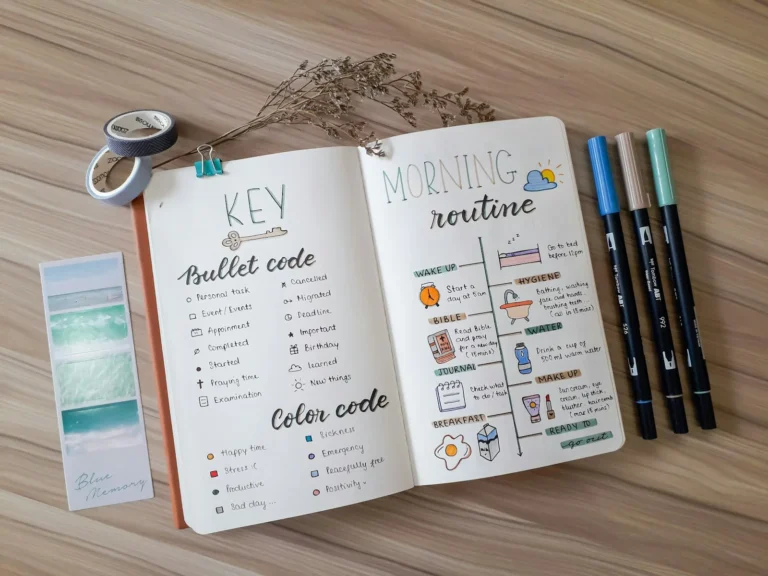
Put your key on the very first page of the notebook, or the inside front cover, somewhere you can reach it without playing hide and seek with your own notebook. List the core bullets, your two or three signifiers, and nothing you do not use. Leave a little room to add a mark later, because you probably will once you spot a recurring need.
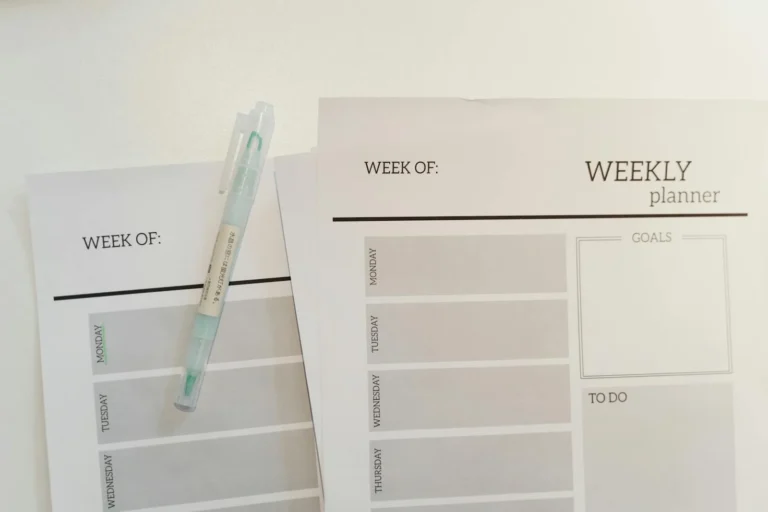
You do not draw the key fresh every notebook from scratch unless you want to. Plenty of people print a small key card and tape it to the inside cover, or keep a slim printable reference for the first few weeks until the symbols are memorized. Creative Fabrica has free printable bullet journal key cards and reference sheets you can download and print on plain paper, handy to tape inside the cover while the system is still new. There is a starter set in the free bullet journal templates post.
When you forget what a symbol meant
It happens to everyone in the first month, you glance at an old entry and blank on the mark. That is not a sign you are bad at this; it is a sign the symbol was not yet a habit. The cure is repetition plus the written key. Flip to your legend, refresh, and keep going. Within a few weeks the core six stop being symbols you decode and become the way you simply read the page, the same way you stopped sounding out words a long time ago.
If you want to see the key in action across real layouts, bullet journal page ideas shows spreads where the bullets and signifiers do their work, and the bullet journal hub explains how rapid logging fits the larger system.
Frequently asked questions about the bullet journal key
What are the basic bullet journal symbols?
The core set is six: a dot for a task, an X for a completed task, a forward arrow ( > ) for a task you moved to next month, a back arrow ( < ) for one you pushed to your future log, a dash for a note, and an open circle for an event. A strikethrough marks a task you have cancelled rather than finished. Most people add an asterisk as a priority signifier, and that is enough to run the whole system.
What does the asterisk mean in a bullet journal?
The asterisk is a priority signifier. You write it to the left of a bullet to flag the entries that matter most, so they stand out in a long list. The key is restraint: if you star half the page, the mark stops meaning anything. Reserve it for the genuine must-dos.
What is the difference between migrated and scheduled?
Both move a task off the current page, but to different places. Migrated ( > ) means you rewrote the task onto next month’s log because it is still worth doing soon; the arrow points forward. Scheduled ( < ) means you moved it into your future log for a specific later date; the arrow points back toward that log near the front of your notebook.
Should I make my own custom symbols?
Eventually, but not on day one. Start with the core six and an asterisk, live with them for a month until they are automatic, then add a custom mark only when you keep hitting a real need the standard key does not cover. Custom symbols invented from imagination tend to be forgotten; ones that grow from an actual pattern stick.
Where should I put my key in the bullet journal?
On the first page or the inside front cover, somewhere you can flip to instantly. List only the bullets and signifiers you actually use, and leave a little space to add one later. A written key is what saves you in the first few weeks, when you will inevitably glance at an old entry and forget what the mark meant.
Six symbols, then let it become second nature
The page that looked like a secret code is really a short, plain language: a dot to do, an X for done, two arrows for things that moved, a dash to remember, a circle for the calendar. Add an asterisk for what matters, write the key on page one, and resist the urge to invent an alphabet before you have used the basics. In a few weeks you will not be decoding anything. You will just be reading your own days, fast.
Want a key card ready to print? Our free printable bullet journal starter kit includes a key reference, a monthly spread, and a daily log you can print at home and tape inside your cover this week. Sign up below and we will send it over.
Get free junk journal printables
New printables, page ideas, and paper craft tutorials, straight to your inbox.
The very first page is where a surprising number of bullet journals die before they begin. You open the new notebook, you know the first page is “the cover,” and suddenly it carries the weight of the whole thing. It has to set the tone. It has to be good. So you put it off…
You spent the better part of an evening on a spread you were proud of. Headers lettered, a tracker laid out, a little color in the corners. Then you turned the page to start the next day and there it was, the whole layout ghosting through from the back, the marker bleeding into shadows of…
You can’t draw. You have decided this about yourself, somewhere back in a childhood art class, and now every time you see a bullet journal with a little banner header and a row of tiny potted plants down the margin, you file it under “not for me.” Here is the thing the people drawing those…
Sunday night, fresh week ahead, and you are staring at two blank pages trying to remember how you laid out last week, the good one, the week the journal actually worked. Was it the vertical columns? The one with the box in the corner for the brain dump? You cannot quite recreate it, so you…
You bought the notebook for the look of it, the clean dotted pages, the promise of spreads like the ones you saved. Then you tried to draw a straight habit-tracker grid freehand, the lines wandered, the boxes came out different sizes, and the page you meant to keep for a year looked like a rough…
You did the hard part. The notebook is set up, the index is labeled, you learned the little symbols, and you kept it going for a week. Then you turned to a fresh spread, pen in hand, and drew a complete blank about what should actually go on it. The setup is finite. The pages…
Manage Consent
To provide the best experiences, we use technologies like cookies to store and/or access device information. Consenting to these technologies will allow us to process data such as browsing behavior or unique IDs on this site. Not consenting or withdrawing consent, may adversely affect certain features and functions.
Functional
Always active
The technical storage or access is strictly necessary for the legitimate purpose of enabling the use of a specific service explicitly requested by the subscriber or user, or for the sole purpose of carrying out the transmission of a communication over an electronic communications network.
Preferences
The technical storage or access is necessary for the legitimate purpose of storing preferences that are not requested by the subscriber or user.
Statistics
The technical storage or access that is used exclusively for statistical purposes.The technical storage or access that is used exclusively for anonymous statistical purposes. Without a subpoena, voluntary compliance on the part of your Internet Service Provider, or additional records from a third party, information stored or retrieved for this purpose alone cannot usually be used to identify you.
Marketing
The technical storage or access is required to create user profiles to send advertising, or to track the user on a website or across several websites for similar marketing purposes.